Kung Paano Pumili ang Tamang Interactive Display para sa Iyong Silid
Maraming mga paaralan na naghahanap ng pinakamahusay na interactive display para sa mga guro ang nais ng isang solusyon na nagpapabuti sa pang-araw-araw na pagtuturo nang walang pagiging kumplikado. Sa mga digital-unang silid-aralan ngayon, ang mga interactive display ay naging mahahalagang tool para sa mga paaralan, mga sentro ng pagsasanay, at mga unibersidad. Ang mga ito ay higit sa malalaking mga screen ng touch-mga platform sila na nagtataguyod ng pakikipagtulungan, pagkamalikhain, at nakalulubog na pag-aaral. Maraming mga tagapagturo ang lumilipat sa mga interactive na pagpapakita ng Qtenboard upang mapalitan ang mga napapanahong projector, ginagawang mas nakakaakit at mahusay ang mga aralin.
Sa napakaraming tatak sa merkado, ang pagpili ng tamang interactive display ay maaaring makadama ng labis - labis na pagpili. Dapat ka bang magtungo ng 65 pulgada o 110 pulgada? Kailangan ba ng mga nakababatang estudyante ang mga nakababatang paninindigan? Kailangan mo ba ng software sa pagtuturo, mga tampok na anti-mistouch, o mga tool na pinapatakbo ng AI? Paano mo talagang sulit ang iyong pamumuhunan?
Ang gabay na ito ay naglalakad sa iyo sa mga pangunahing kadahilanan upang isaalang-alang at itinatampok kung paano ipinapakita ng Qtenboard ang mga solusyon na nakatuon sa edukasyon na may malakas na matisadware, makinis na pagganap ng touch, mayamang software sa pagtuturo, disenyo ng anti-mistouch, at nagtatampok ng AI-perpekto para sa mga silid-aralan ng anumang laki at pangkat ng edad sa buong mundo.
Nagpapatakbo ka man ng isang kindergarten, pangunahing paaralan, high school, training center, o unibersidad, ang gabay na ito ay tumutulong sa iyo na pumili ng isang interactive display na talagang nagpapahusay sa pag-aaral.
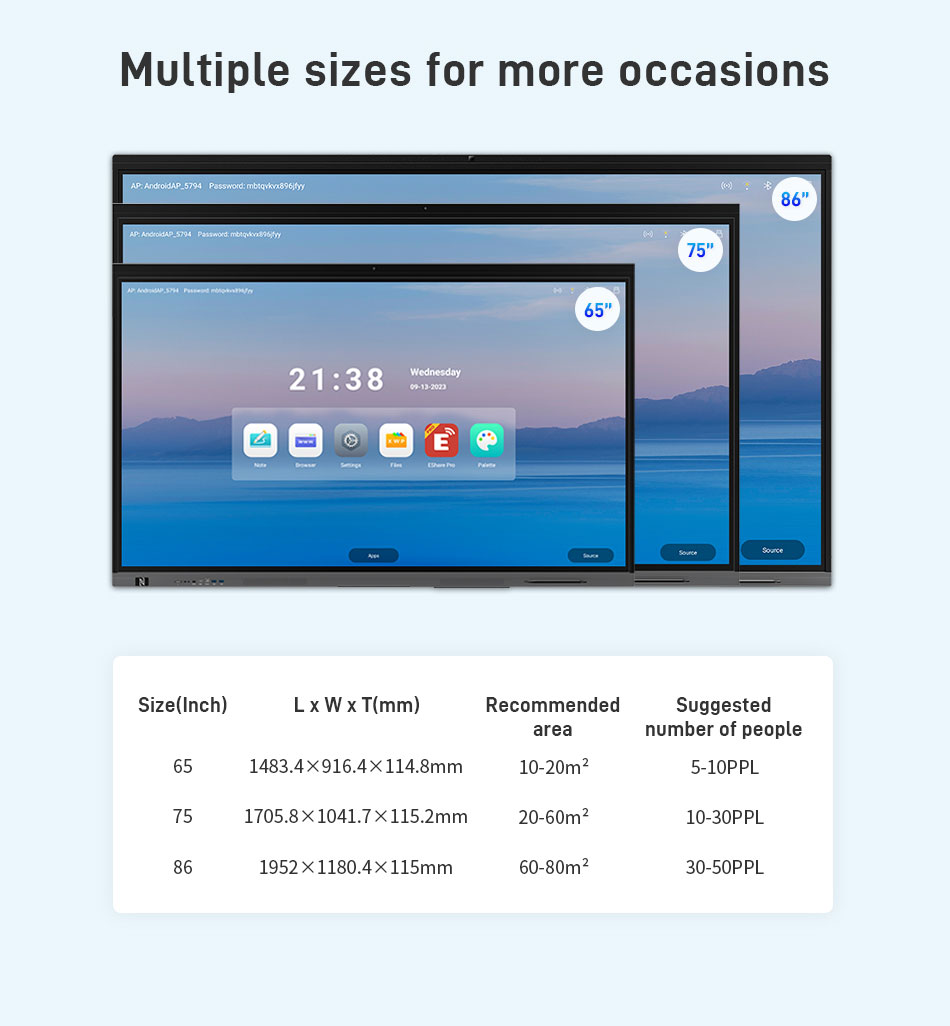
1. Magsimula sa mga Pangunahing: Ano ang Laki ng Iyong Aralan?
Ang unang hakbang sa pagpili ng isang interactive display ay ang pagtatasa ng laki ng iyong silid aralan. Ang laki ng screen ay nakakaapekto sa kakayahang makita, pakikipag-ugnayan sa mag-aaral, at kadalian ng paggamit.
Nag-aalok ang Qtenboard ng isang buong saklaw ng mga laki: 55, 65, 75, 86, 98, at 110 pulgada, na sumasaklaw sa lahat mula sa maliliit na silid-aralan hanggang sa malalaking bulwagan ng panayam.
Mga Maliliit na Silid-aralan (Kindergarten, Maagang Pangunahing)
- Ang 55-pulgadang Qtenboard display ay perpektod
- Maliwanag ang mga visual nang walang labis na mga kabataang nag - aaral
- Madaling maabot ng mga guro ang lahat ng bahagi ng screen
- Ang mga naaayos na stand ng mobile ay nagpapahintulot na maging ang maliliit na mga bata na makipag - ugnayan
- Tinitiyak ng disenyo ng Anti-mistouch ang ligtas na pagpapataka
Karaniwang Pangunahing mga silid-aralan (~ 6 metro ang lalim)
- 65-inch Qtenboard display ng balanses na kakayahang makita at puwang
- Maaaring makita ng mga estudyante sa likuran ang nilalamang
Malalaking Pangunahing o Sekondarya na Silid-aral
- Nag-aalok ang 75-inch Qtenboard display ng isang nakalulubog na karanasang
- Sapat na malaki para sa maraming mag-aaral na makipagtulungan nang sabaya
Mga College Lecture Hall at Auditoriums
- 86-pulgada o 98-pulgadang pagpapakita ng trabaho para sa daluyan o malalaking silid-aralang
- Ang 110-inch Qtenboard display ay perpekto para sa malalaking awditoryum o mga bulwagan ng panayam na may daan-daang mga mag-aaral
- Ang mga panel ng high-lightness ay nagpapanatili ng kalinawan kahit na sa mga maliit na kapaligirang
Kung Bakit Mahalaga ang Pagpili ng Tamang Laki ng Scren
- Komportableng panonood para sa lahat ng mag-aaral
- Madaling pakikipag-ugnay para sa mga guro
- Nakikibagay na mga kaayusan sa pag-upo
- Magandang pakikipagtulungan at gawaing pangkat
- Alisin ang display ng nilalaman ng multimedia
2. Isaalang - alang ang Panahon ng Iyong mga Nagtututo
Ang iba't ibang mga pangkat ng edad ay magkakaiba sa pakikipag-ugnay sa teknolohiya. Ang mga epekto ng edad ay nagpapakita ng laki, uri ng pag-install, at ergonomics.
Mga Batang Bata (Kindergarten - Baitang 3
Mas maikli ang taas, na parang magtipon sa paligid ng dispye
Ang pakikipag-ugnayan ng Hand-on ay pinakamahusay na gumagana para sa pag-aaral
Inirekumendang pag-setup:
- 55-pulgadang display na naaayos na stand ng mobile
- Opsyonal na paninindigan para sa komportableng pagsulat at paghawa
- Tinitiyak ng teknolohiyang kontra-mistouch ang ligtas na operasyon
Mga Matandang Pangunahing Mag-aaral
Mas malaya, mahusay na mga kasanayan sa motor na binuo
- Mahusay na gumagana ang 65-pulgada o 75-pulgadang displeys
- Opsyonal na nakatayo; praktikal ang mga mount ng pader
Pangalawang Mag-aaral at Mga Tin - edyer
Mahalaga ang nababaluktot na layout ng silid-aralan...
Mas madalas ang mga aktibidad ng pangkat
- Pinapayagan ng mga mobile stand ang madaling pagsasaayos ng silid
- Ang tampok na kontra-mistouch ay tinitiyak ang tumpak na pakikipag-ugnayan ng multi-user
Mga Nag-aaral sa Kolehiyo at Pang-adulto
Unahin ang mga malinaw na visual at makinis na multi-touch
- 86, 98, o 110-pulgadang pagpapakita ay nakakatugon sa mga pangangailangan ng propesyonal na pagtuturo
- Built-in na software ng pagtuturo at mga tool ng AI para sa matalinong anotasyon, auto-grading, at suporta sa aral
3. Pag - isipan ang Iyong Araw - araw na mga Kasama sa Pagtuturo
Ang mga interactive display ng Qtenboard ay may isang kumpletong ecosystem ng edukasyon:
- Mga pagpapaandar ng Whitebod
- Mga tool sa anotasyo
- Ibinahagi ng Wireless scren
- Pamamahala ng file
- Pagtuturo ng software...
- Mga tampok na pinapatakbo ng AI
Ang pagpaplano ng iyong daloy ng trabaho ay tinitiyak na makakakuha ka ng pinakamarami sa iyong displey.
A. Mga Presentasyon at Biswal na Nilalaman
- Built-in whiteboard para sa mga tsart, sulat-kamay, multimedia, mga tool sa matematika, template
- Katutubong suporta para sa PowerPoint, Google Slides, na may direktang anotasyon
- Sinusuportahan ang mga app ng nilalamang pang-edukasyon tulad ng Iolaos para sa nakakaakit na mga aral
B. Mga Ready-Made
- Access beanie Institute, BBC Bitesize, TED-Ed
- Pinapayagan ng Android platform ang mga tool sa YouTube, Google, at higit pa.
- Ang mga tampok na AI ay maaaring magmungkahi ng mga plano sa aralin at interactive na nilalamang
C. Mga Trabaho at Mga Aktibidad sa Silid
- Sinusuportahan ang Twinkl, TopMarks, PhET, at iba pa.
- I-import ang PDF, anotate, i-save ang mga pagbabago, ibahagi sa mga mag-aaral
D. Mga Tulong ng Cloud at Pakikipagtulungang
- Sinusuportahan ang Microsoft 365, Google Workspaces
- Real-time na pag-edit at pakikipagtulungang
- Gumagawa nang walang seam sa Qtenboard wireless casting
4. Kung Bakit ang Qtenboard ang Pinakamahusay na Interactive Display para sa Edukaso
A. Mahusay na Pagganap
- Mabangis, tumpak na pagsulat at multi-touch
- Pinipigilan ng teknolohiyang kontra-mistouch ang mga hindi sinasadyang input
- Ang mga tampok na AI ay tumulong sa anotasyon at kahusayan ng aral
B. Kaligtasan at Pagpapatibay
- 4 mm na anti-glare tempered baso
- Blue light filter, anti-fingerprint coatin
- Ligtas at pangmatagalan para sa paggamit ng mag-aaral
C. Madaling Pakikipagtulungan sa Wireless
- Magbahagi ng mga screen mula sa mga laptop, tablet, at telepono
- Walang mga kumplikadong app o dongles
D. Built-In Teaching Software at AI
- Sinusuportahan ang isang malawak na hanay ng mga app sa edukasyon
- Ang mga tool ng AI ay nagbibigay ng auto-grading, mga mungkahi sa aralin, at mga interactive na aktiban
- Pinapalakas ang pagiging produktibo ng guro at pakikipag-ugnayan sa mag-aaral
E. Zero Sukripisyo
- Whiteboard, anotasyon, pagbabahagi ng screen, touch ng multi-user, at mga Android apps
- Buong pag-andar nang walang labis na gasto
F. Nakikibagay na Pag-install
- Mga mobile stand, mga mount ng dingding, maiuwi ang taas, mga pagpipilian sa pagkiling
- Napakabagay sa lahat ng mga layout ng silid-aralan at mga pangkat ng edad
G. Pandaigdigang Suporta at Suko
- Ang Qtenboard ay isang pandaigdigang interactive display supplier
- Sinusuportahan ang mga pang-internasyonal na proyekto na may maaasahang, pangmatagalang tulong na panteknikal
- Tinitiyak na ang mga paaralan sa buong mundo ay may matatag at propesyonal na serbisyon
FAQ: 1 Ano ang pinakamahusay na laki ng interactive display para sa isang silid-aralan?
65-75 pulgada ang nagtatrabaho para sa karamihan ng mga silid-aralan, habang ang malalaking bulwagan ng panayam ay maaaring mangailangan ng 86 pulgada o higit pa.
5. Konklusyon: Paano Pupiliin ang Tamang Interactive Display para sa Iyong Paaralan
Kapag pumipili ng isang interactive display, isaalang - alang ang laki ng silid - aralan, edad ng nag - aaral, at mga mapagkukunan ng pagtuturo na inaasahan mo. Ang wastong pagsusuri ay tinitiyak na ang iyong pamumuhunan ay nagpapabuti ng pakikipagtulungan, pakikipag-ugnayan, at mga kinalabasan sa pag-aaral.
Ang mga interactive display ng Qtenboard ay idinisenyo para sa edukasyon:
- Buong saklaw ng laki (55-110 pulgada)
- Intuitive software at mga tampok na pinapatakbo ng AI
- Mahusay na karanasan sa touch sa disenyo ng anti-mistouch
- Kaugnay ng Android platforms
- Matagal na pagbuo para sa pangmatagalang paggamita
- Pangglobong suplay at suporta
Ang Qtenboard ay higit pa sa isang screen.
Ito ay isang kumpletong solusyon sa pagtuturo na nagbibigay ng kapangyarihan sa mga guro at nagbibigay inspirasyon sa mga mag-aaral.


 FIL
FIL
 EN
EN  MAY
MAY  TH
TH  CHT
CHT  ID
ID  BUR
BUR  HKM
HKM  LAO
LAO  SIN
SIN  VIE
VIE