Pakilala: Ang Modern Office Hamon
Ang mga bukas na tanggapan ay nangako na baguhin ang pakikipagtulungan: alisin ang mga cubicle, hikayatin ang pakikipag-ugnayan, at gawing walang tigil ang koponan. Gayunman, maraming empleyado ang nasisiphayo. Ang bukas na layout ay madalas na humahantong sa patuloy na mga pagkagambala, na ginagawang mahirap makahanap ng isang tahimik na puwang upang mag-isip, magbahagi ng puna, o hash out ng mahahalagang desisyon. Sa mga nasabing kapaligiran, kahit na ang isang maikling pagpupulong ay maaaring maging hindi mabisa, kasama ang mga kalahok na nakasandal sa mga monitor o sinusubukang lup ang mga liblib na kasamahan mula sa maingay na mga sulok.
Isaalang - alang ito: Ang average na empleyado ay gumugugol ng 11.3 oras bawat linggo sa mga pagpupulong, halos 28% ng lingguhang trabaho. Sa napakaraming oras na nakatuon sa mga talakayan, ang maling pag-setup ay maaaring makabuluhang mabawasan ang pagiging produktibo. Ang mga negosyo ay nangangailangan ng compact, na pinagana ang mga puwang-huddle na silid-na nagtataguyod ng pokus, kahusayan, at pakikipagtulungan. At sa gitna ng pagbabagong ito ay ang Qtenboard smart board, na ginagawa ang maliliit na puwang sa mga hub ng produktibo.
Ano ba ang Huddle Room?
Ang isang huddle room ay isang maliit, umangkop na puwang ng pagpupulong na idinisenyo para sa 2-6 na mga kalahok. Hindi tulad ng mga tradisyunal na silid ng kumperensya, ang mga silid ng huddle ay na-optimize para sa mabilis na pag-access, kaunting pag-setup, at pakikipagtulungan na handa na ng hybrid. Kasangkapan ng mga de-kalidad na display, camera, at matalinong board, pinapayagan ng mga silid na ito ang mga koponan na mag-iisip, kasalukuyan, at makipagtulungan nang walang teknikal na alitan.
Ang mga smart board ng Qtenboard ay perpekto para sa mga huddle room. Sa resolusyon ng 4K, pag-andar ng multi-touch, at mga tampok na pinapatakbo ng AI tulad ng Speech-to-Text, Mga Minuto ng pagpupulong, Q&A, at Smart Assistant, ang mga koponan ay maaaring likas na pakikipag-ugnay, maging on-site o remote. Ang pagdaragdag ng isang sistema ng DMS ay nagbibigay-daan sa timed power on / off, remote monitoring, at pamamahala ng application, na tinitiyak ang bawat huddle room ay palaging handa para sa pagkilos.
5 Mga Dahilan na Kailangan ng Iyong Opisina ng isang Qtenboard-Powered Huddle Room
1. Kahusayan at Bilisd
Ang mga malalaking silid ng kumperensya ay madalas na nakaupo na walang kabuluhan habang ang maliliit na gawain at kusang pagpupulong ay hindi natutugunan. Inaalis ng mga silid ng Huddle ang kawalan ng kahusayan na ito. Sa pamamagitan ng isang Qtenboard smart board, ang mga empleyado ay maaaring agad na magsimula ng isang sesyon ng pakikipagtulungan, mga slide ng anotate, o nag-iisip ng mga ideya sa real time.
- Visual Pakikipagtulungan: Ang mga koponan ay maaaring mag-sketch ng mga diagram, mai-highlight ang mga pag-update ng proyekto, o direktang mga tsart ng annotate sa 4K display, na lumilikha ng kalinawan at bilis na paggawa ng desisyon.
- Tulong sa Pagpupulong ng AI: Ang mga Minuto ng Pagpupulong ng Qtenboard ay awtomatikong nagtatala ng mga talakayan at bumuo ng mga buod, binabawasan ang mga follow-up na email at tinitiyak na ang lahat ay mananatiling nakahanay.
2. Pakikipagtulungan ng Hybrid
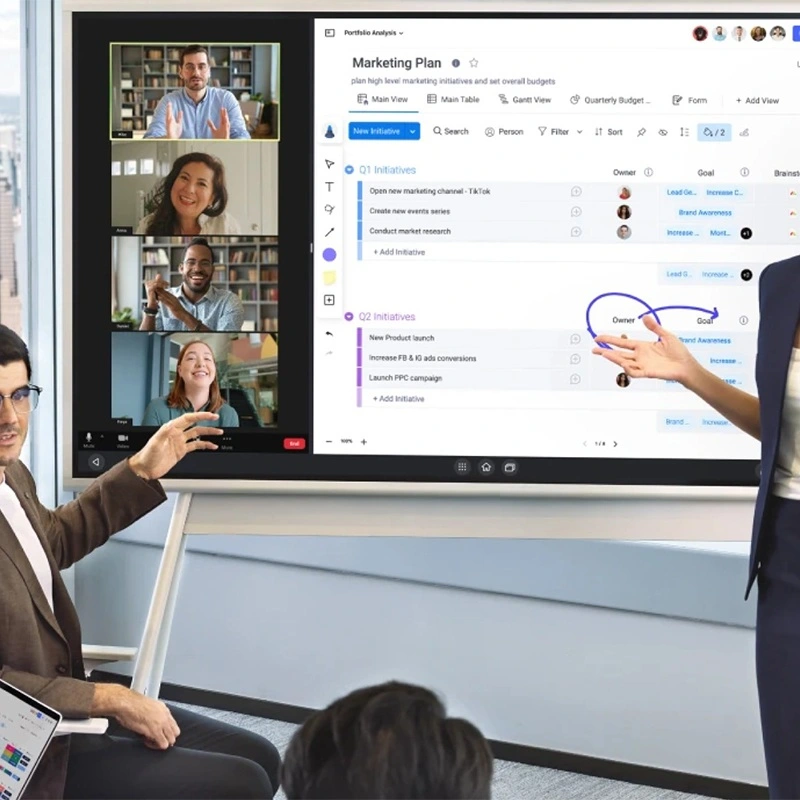
Noong 2025, ang gawaing hybrid ay ang pamantayan. Maraming empleyado ang naghahati ng kanilang oras sa pagitan ng opisina at tahanan. Ang mga Qtenboard smart board ay nagbibigay-daan sa seamless pagsasama sa Zoom, Teams, at Google Workspace, sumusuporta sa pagbabahagi ng wireless screen, reverse touch control, at anotasyon sa multi-user. Ang mga malalayong kalahok ay maaaring makipag-ugnay na parang nasa silid sila, na lumilipat lampas sa passive screen pagbabahagi.
Halimbawa: Sinuri ng isang koponan sa marketing ang isang kampanya sa lugar habang ang mga remote na kasapi ay nagmamanipula ng mga visual sa parehong board, ang mga pag-update agad.
3. Optimization sa Space
Ang mga silid ng Huddle ay nagbabago ng mga hindi ginagamit na mga kanto ng lugar, maliliit na tanggapan, o mga silid-sa mga produktibong zone ng pakikipagtulungan. Sa Qtenboard, pinapayagan ng tampok na pamamahala ng multi-user ang maraming mga miyembro ng koponan na magsulat o makipag-ugnay nang sabay-sabay, pag-maximize ng halaga ng limitadong puwang.
4. Kahusayan ng gasto
Kung ikukumpara sa mga tradisyunal na silid ng kumperensya, ang mga silid ng huddle ay nangangailangan ng mas kaunting puwang, mas mababang gastos sa pagpapanatili, at mas kaunting mapagkukunan. Ang pagsasama ng isang Qtenboard smart board ay binabawasan ang pangangailangan para sa maraming mga aparato (projector, monitor, webcam, system ng speaker), pagsasama-sama ng hardware at pagbaba ng pangkalahatang gastos.
5. Kasiyahan ng mga Emperya
Ang mga bukas na tanggapan ay maaaring maging maingay at nakagagambala. Ang mga Huddle room na nilagyan ng Qtenboard ay nagbibigay ng isang pribado, kinokontrol na kapaligiran. Ang pagkilala sa ultra-low na touch at pagiging sensitibo sa presyon ay nag-aalok ng isang natural, tulad ng papel na karanasan sa pagsusulat. Pinagsama sa tulong ng AI, ang mga empleyado ay nasisiyahan sa mas maayos, mas intuitive na pakikipagtulungan, nagpapalakas ng kasiyahan at pagiging produktibo.
Mga Pangunahing Elemento ng isang Mabisang Qtenboard Huddle Room
Disenyo at Kaaliwa
- Ang mga upuan ng Ergonomic at mga mobile table ay naghihikayat sa pagkamalikhain.
- Ang malambot na ilaw at malinis na layout ay nagpapahusay ng pokus.
- Ang maliliit na mga ugnayan tulad ng mga acoustic panel o malambot na pagtatapos ay nagbabawas ng mga kaguluhan.
Layout at Layo
- Ang mga ideyal na silid ng huddle ay mula sa 100-200 sq. ft, na tumatanggap ng 2-6 na mga kalahok.
- Pinapayagan ng modulang kasangkapan ang kakayahang umangkop para sa mga pagpupulong ng brainstorming, pagsasanay, o kliyente.
Acoustics at Pribadyas
- Ang mga dingding na hindi na ginagawa ng tunog, dobleng-paned na baso, at mga materyales sa pagbawas ng ingay ay tinitiyak ang kalinawan.
- Sinusuportahan ng pagsubaybay sa AI camera sa Qtenboard ang mga hybrid na pagpupulong nang hindi nakakagambala sa mga background o manu-manong pagsasaayos.
Teknolohiya ng Huddle Room na may Qtenbod
Mahahalagang Komponent
- 55" 4K Qtenboard displey na nakikita sa lahat.
- All-in-one video bar: mga nagsasalita ng camera mic.
- Ang pagbabahagi ng nilalaman ng Wireless at reverse control para sa madaling pakikipagtulungan ng hybrid.
- Maaasahang broadband na may marka ng enterprise na Wi-Fi.
- Mga outlet ng kuryente, pamamahala ng cable, at modular na kasangkapan para sa kakayahang umangkop.
Inirekomendang mga Katangian
- Mga sistema ng pag-book ng silid at digital signage.
- Interactive Whiteboard software: Mga Planet, Periodic Table, Piano, Formula, Statistical Charts, Crosswords, OCR.
- Pagsasama ng Cloud: OneDrive, Google Drive, FTP para sa pagbabahagi ng file at pakikipagtulungan ng multi-user.
Advanced na Kakayahang Qtenboard
- AI Smart Assistant: Sumusuporta sa Q&A, pagkilala sa pagsasalita, at awtomatikong mga buod sa pagpupulong.
- Sistema ng DMS: Remote control sa pamamagitan ng mobile, timed power on / off, paglabas ng utos, at query ng log ng operasyon.
- Mga tampok sa seguridad: lock ng USB, lock ng HDMI, Screen lock, Pattern lock, APK Install lock.
- Mga pagpapahusay sa pagsulat: Visual zero latency, may kamalayan sa hugis, pagkilala sa maraming antas, ultra-mababang touch (0.5 mm)..
Kung Paano Lilikha ang isang Qtenboard Huddle Room na Gumagala
- Magsimula sa umiiral na espasyo: I-convert ang mga sulok, hindi ginagamit na mga tanggapan, o maliliit na silid ng komperensiya.
- Unahin ang nababagabag na mga muwebles: Mobile, stackable, at ergonomic para sa mabilis na pagsasaayos.
- Maagang isama ang teknolohiya: Ang mga Mount camera, paglalagay ng mga display sa antas ng mata, tiyakin ang lakas at pag-access sa network.
- Disenyo para sa pagtuon: Ang maliit na pag-iingat, mga nasusulat na ibabaw, at mga tool sa pakikipagtulungan ng wireless.
- Ito’y tanggapin: Gumamit ng luntian, likas na liwanag, at mga kulay ng accent upang mapasulong ang ginhawa at pagkamalikhain.
Mga Kaso sa Paggamit ng Huddle Room
Mga Pagpupulong sa Proyekto
- Mabilis na mga pag-update, utak, at mga ulat ng katayuan.
- Anotate ang mga tsart, timeline, o sprint board direkta sa Qtenboard, nakikita sa mga malalayong kalahok.
Pag - isip ng mga Sesyo
- Ang mga nababaluktot na silid ng huddle ay nagtataguyod ng pagkamalikhain at pag-iisip sa labas ng kahon.
- Sinusuportahan ng Qtenboard Whiteboard ang maraming mga gumagamit, mga advanced na pormula, at mga interactive na visual.
Mga Pagpupulong ng Kliyent o Kasosyon
- Matalik at propesyonal na puwang para sa mga pagtatanghal.
- Ang mga dual na display at pagsasama ng cloud ay nagpapahintulot sa mga hybrid na session ng kliyente na walang tigil.
Mga Pag-uusap
- Pribadong puna o mga sesyon sa pagtuturo.
- Ang mga tampok ng AI ay awtomatikong nagbubuod ng mga talakayan at subaybayan ang mga pangunahing punto.
Araw-araw na Mga Pagpupulong na Stand-Up o Huddle
- Mabilis na mga sesyon ng pagkakahanay ng 5-10 minuto.
- Pinapayagan ng mga kakayahan sa multi-touch ang mabilis na anotasyon at pagbabahagi ng ideya.
Ang Kinabukasan ng Huddle Rooms na may Qtenbod
Ang mga Huddle room ay lalong sentral sa disenyo ng tanggapan. Sa Qtenboard, ang susunod na henerasyon ng mga puwang ng pakikipagtulungan ay:
- Mabisa at napapanatili ang enerhiya.
- Napagana ang AI para sa auto-booking, pagsubaybay sa camera, at analytics.
- Nakikibagay para sa mga hybrid workforce, pinapayagan ang mga kalahok sa malayo at in-office na natural na makipag-ugnay.
Halimbawa ng kwento: Ang isang lumalaking teknolohiyang pagsisimula ay nagpatupad ng Qtenboard sa kanilang mga huddle room. Sa loob ng ilang linggo, ang mga pagpupulong sa pagpaplano ng proyekto ay nabawasan ng 30%, ang mga marka sa pakikipag-ugnayan ay tumaas, at ang mga liblib na miyembro ng koponan ay nag-ulat ng pakiramdam na "naharap tulad ng sa tanggapan."
Konklusion: Bakit ang mga Qtenboard Smart Board ay Mahalaga para sa Huddle Rooms.
Ang mga silid ng Huddle na nilagyan ng mga smart board ng Qtenboard ay hindi lamang isang trend - ang mga ito ay isang pangangailangan para sa modernong pakikipagtulungan. Sa mga 4K multi-touch display, mga tool na pinapatakbo ng AI, pamamahala ng DMS, at matatag na seguridad, Ang mga matalinong board na ito ay nagbabago ng maliliit na puwang sa lubos na produktibong mga hub ng pakikipagtulungan.
Kung ito ay:
- Hybrid na pakikipagtulungan sa mga malalayong koponan,
- Mga sesyon ng malikhaing brainstorming,
- One-on-one coaching, o
- Mabilis na mga pagpupulong,
Nagbibigay ang Qtenboard ng mga tool, kakayahang umangkop, at katalinuhan upang mabilang ang bawat pagpupulong.
Mga FAQ
Ano ba ang isang huddle room?
Isang maliit, nababaluktot na puwang ng pagpupulong para sa 2-6 na mga kalahok, na-optimize para sa hybrid at on-site na pakikipagtulungan.
Maaari ko bang gamitin ang Qtenboard bilang isang multi-purpose display?
Oo. Sinusuportahan nito ang input ng 4K HDMI, wireless casting, at interactive na mga application ng whiteboard.
Madali bang pamahalaan ng Qtenboard nang malayo?
Totoo. Pinapayagan ng sistema ng DMS ang mobile control, remote monitoring, firmware upgrades, at mga log ng operasyon.
Maaari bang sumulat ng maraming mga gumagamit nang sabay-sabay?
Oo. Sinusuportahan ng Qtenboard ang pamamahala ng multi-user, multi-touch, at advanced na mga pagpapaandar ng whiteboard.
Gaano kaligtasan ang Qtenboard?
Kasama sa mga tampok sa seguridad ang USB / HDMI / Screen lock, mga lock ng pattern, pag-install ng mga lock ng APK, at mapasadya na kontrol sa pag-access.


 FIL
FIL
 EN
EN  MAY
MAY  TH
TH  CHT
CHT  ID
ID  BUR
BUR  HKM
HKM  LAO
LAO  SIN
SIN  VIE
VIE