
Kapag nanonood tayo ng mga video online, maging sa isang smartphone, tablet, computer, o malaking komersyal na screen, karaniwang binibigyan kami ng pagpipilian upang pumili ng resolusyon ng video. Kasama sa mga karaniwang pagpipilian ang 360p, 720p, 1080p, at kahit na 4K o 8K.
Ang resolusyon ay hindi lamang isang kadahilanan na nakakaapekto sa karanasan sa pagtingin - gumaganap din ng isang kritikal na papel kapag bumili ng mga elektronikong aparato tulad ng TVs, interactive whiteboard, mga digital signage display, kiosk, at LED o LCD video wall.
Kabilang sa lahat ng mga resolusyon na ito, ang 1080p ay nananatiling isa sa pinakalawak na ginagamit na pamantayan sa parehong mga aplikasyon ng mamimili at komersyal. Ngunit mayroon pa ring nakakagulat na karaniwang tanong:
Ilang mga pixel ang nasa 1080p, at bakit mahalaga para sa iyong negosyo o proyekto sa pagpapakita?
Sa artikulong ito, sasagutin natin ang katanungang iyon nang detalyado, ipaliwanag kung paano ihahambing ang 1080p sa iba pang mga resolusyon, at tulungan kang magpasya kung ang 1080p ang tamang pagpipilian para sa iyong aplikasyon. Ipaliliwanag din namin kung paano ang Qtenboard, bilang isang propesyonal na tagagawa ng pagpapakita ng komersyo, ay sumusuporta sa 1080p at mas mataas na mga resolusyon upang matugunan ang iba't ibang mga pangangailangan sa negosyo.
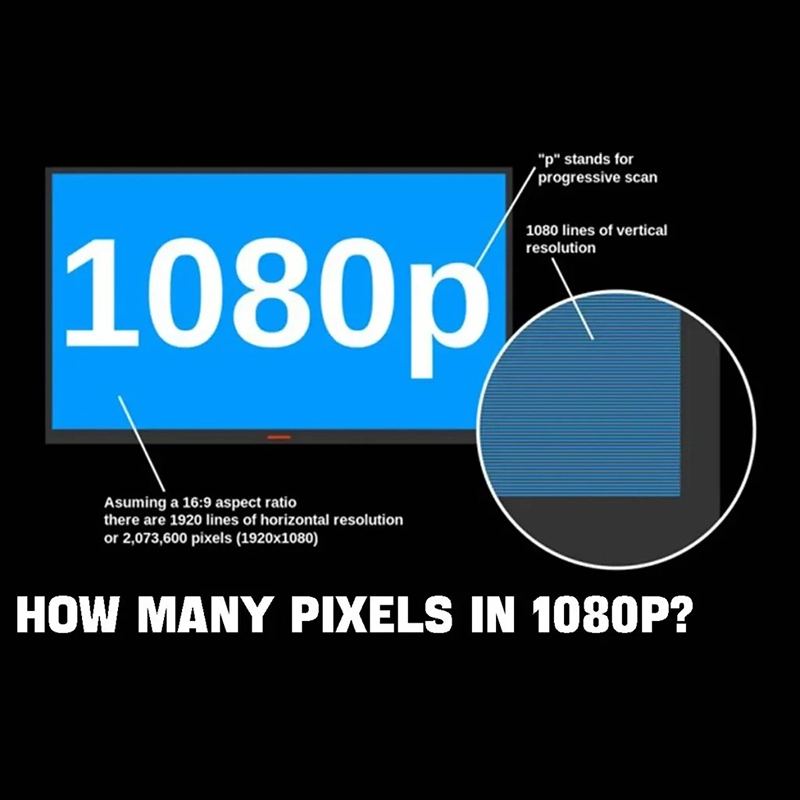
Ang isang resolusyon ng 1080p ay tinukoy1920 × 1080Mga pixel.
Upang makalkula ang kabuuang bilang ng mga pixel:
1920 × 1080 = 2,073,600Pixels
Kaya, ang 1080p ay naglalaman ng eksakto2,073,600Mga pixel, na kung bakit madalas itong tinutukoy bilang Full HD (Full High Definition).
Ang progresibong pag-scan ay nangangahulugang ang imahe ay naka-refresh na linya ayon sa linya sa pagkakasunud-sunod, na nagreresulta sa makinis na paggalaw at mas mahusay na kalidad ng imahe-lalo na mahalaga para sa pag-playback ng video, mga pagtatanghal, at interactive na nilalaman.
Para sa kadahilanang ito, ang 1080p ay naging pamantayan ng pangunahing resolusyon para sa mga TV, monitor, interactive display, at mga digital signage screen sa buong mundo.
Ang resolusyon ay tumutukoy sa bilang ng mga pixel na ipinakita sa screen nang pahalang at patayo. Ang mga pixel ay ang pinakamaliit na mga yunit na bumubuo ng isang imahe. Ang mas maraming mga pixel mayroon ang isang screen, mas maraming detalye maaari itong ipakita.
Sa mga praktikal na termino:
Gayunpaman, ang mas mataas na resolusyon ay nangangahulugang:
Iyon ang dahilan kung bakit 1080p ay madalas na itinuturing na perpektong balanse sa pagitan ng kalinawan, gastos, at pagganap.
Upang mas maintindihan ang 1080p, ihambing natin ito sa iba pang mga tanyag na resolusyon:
| Resolusyong | Mga Dimensyon ng Pixel | Kabuuang mga Pixels |
|---|---|---|
| 360p | 640 × 360 | 230,400 |
| 720p (HD) | 1280 × 720 | 921,600 |
| 1080p (Full HD) | 1920 × 1080 | 2,073,600 |
| 4K (UHD) | 3840 × 2160 | 8,294,400 |
| 8K | 7680 × 4320 | 33,177,600 |
Mula sa paghahambing na ito, malinaw na:
Ang pangunahing pagkakaiba sa pagitan ng 720p at 1080p ay nakasalalay sa bilang ng pixel:
Nangangahulugan ito na ang 1080p ay naghahatid ng makabuluhang mas detalye, lalo na kapansin-pansin sa:
Para sa mga komersyal na pagpapakita, tulad ng digital signage sa mga shopping mall o interactive whiteboard sa mga silid-aralan, Nagbibigay ang 1080p ng isang kapansin-pansin na mas propesyonal at pinakintab na visual na karanasan.
720p
1080p
Ito ang dahilan kung bakit ang karamihan sa mga komersyal na pagpapakita ng Qtenboard at interactive panel ay gumagamit ng 1080p bilang isang minimum na pamantayan, tinitiyak ang kalinawan at pagiging maaasahan sa iba't ibang mga kapaligiran.
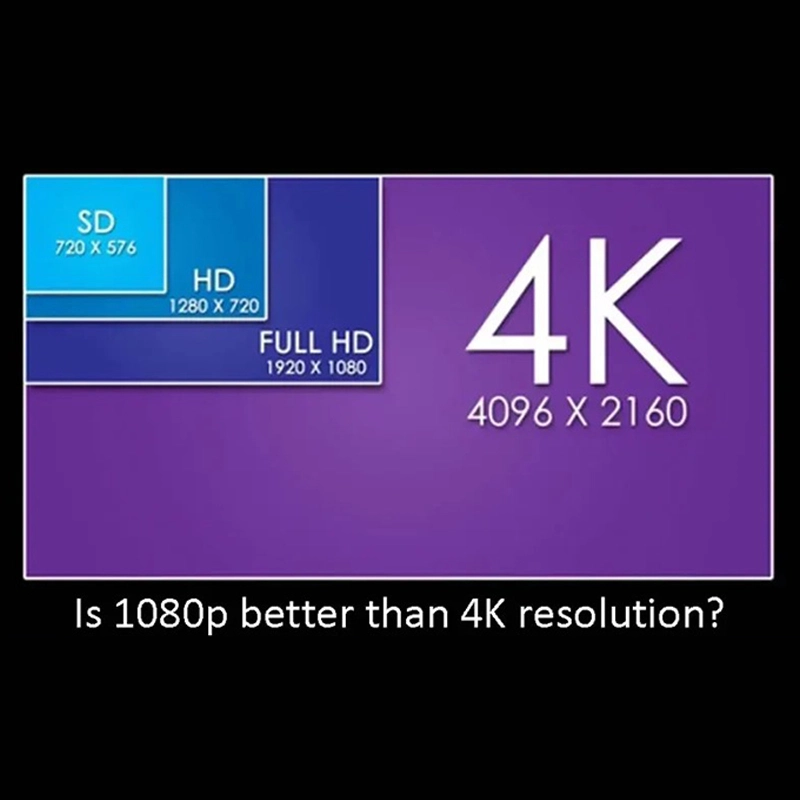
Mula sa isang pulos panteknikal na pananaw, ang resolusyon ng 4K ay nakahihigit sa 1080p sa mga tuntunin ng detalye ng imahe. Sa apat na beses ng bilang ng mga pixel, nag-aalok ng 4K:
Gayunpaman, ang resolusyon ay hindi lahat ng bagay. Kapag pumili sa pagitan ng 1080p at 4K, dapat mong isaalang-alang:
Kung ikukumpara sa 4K:
Para sa maraming mga negosyo, lalo na ang mga nag-deploy ng maraming mga screen, ang 1080p ay nagbibigay ng isang mas mahusay na pagbabalik sa pamumuhunan.
Ang sagot ay nakasalalay sa iyong application-ngunit para sa karamihan ng mga kaso, oo.
Mga Kaso ng Pang-idewal na Paggamit para sa 1080p
Para sa mga kapaligiran na ito, ang 1080p ay naghahatid ng malinaw na mga visual nang walang hindi kinakailangang gastos.
Maliban kung nagtatrabaho ka sa propesyonal na paggawa ng video, disenyo ng high-end, o ultra-malalaking mga dingding ng video na tiningnan mula sa napakalapit na distansya, Ang 1080p ay higit sa sapat.
Kung ikukumpara sa 4K at 8K, ang 1080p ay mas madaling pamahalaan habang nag-aalok pa rin ng mahusay na pagganap ng visual.
Kahit na sa mga kasong ito, maraming mga customer ang pumili ng mga solusyon sa Qtenboard na sumusuporta sa parehong 1080p at 4K, pinapayagan ang mga pag-upgrade sa hinaharap nang hindi pinapalitan ang hardware.
Sa mga komersyal na kapaligiran, ang pagiging maaasahan at kahusayan sa gastos ay kasing mahalaga ng resolusyon.
Ang 1080p ay naging pamantayan ng industriya para sa:
Dinisenyo ng Qtenboard ang mga produkto nito na may na-optimize na pagganap ng Full HD, na tinitiyak ang matatag na operasyon para sa mahabang oras at tuloy-tuloy na pag-playback.
Bilang isang propesyonal na tagagawa ng mga solusyon sa pagpapakita ng komersyo, sinusuportahan ng Qtenboard:
Mga Bentaha sa Produkto ng Qtenbod
Sa pamamagitan ng pag-aalok ng maraming mga pagpipilian sa resolusyon, pinapayagan ng Qtenboard ang mga customer na pumili ng pinakamahusay na solusyon batay sa badyet, aplikasyon, at pagiging sukat sa hinaharap.
Sa artikulong ito, sinagot namin ang tanong na "Ilang mga pixel ang nasa 1080p?" at ginalugad kung bakit ang 1080p ay patuloy na maging isa sa mga pinakatanyag na resolusyon ngayon.
Kasay2,073,600Ang mga pixel, 1080p ay nag-aalok ng isang malakas na balanse sa pagitan ng kalinawan, pagganap, at gastos. Habang ang mas mataas na mga resolusyon tulad ng 4K at 8K ay nakakakuha ng pansin, ang 1080p ay gumaganap pa rin ng isang kritikal na papel sa mga pagpapakita ng negosyo, edukasyon, tingi, at mga sistema ng impormasyon sa publiko.
Sa mga solusyon sa pagpapakita ng propesyonal ng Qtenboard, Ang mga customer ay may pagtitiwala na mag-deploy ng 1080p display ngayon habang nananatiling handa para sa mga pag-upgrade sa hinaharap. Ang kakayahang umangkop na ito, na sinamahan ng maaasahang kalidad at propesyonal na suporta, ginagawa ang Qtenboard na isang pinagkakatiwalaang kasosyo para sa mga proyekto sa pagpapakita ng komersyo sa buong mundo.
Click upang basahin ang mga detalye ng produkto at malaman ang tungkol sa mga tampok na pagganap at aktwal na pagganap.
📖Basahin ang Producto
 FIL
FIL
 EN
EN  MAY
MAY  TH
TH  CHT
CHT  ID
ID  BUR
BUR  HKM
HKM  LAO
LAO  SIN
SIN  VIE
VIE